


Table of Contents
Learn how to update an existing template, including fields, structure, and settings, in just a few steps.
Editing a template in Knowella allows you to update its structure, fields, or settings to match changing business needs.
You can make changes such as:
- Adding or removing fields
- Updating sections or form structure
- Modifying settings and permissions
- Improving clarity or data capture
Who can edit a Template?
Only users with the required permissions can edit templates.
Typically, this includes:
- Company Admin
- Facility Admin
Access depends on your organization’s role and permission settings.
Steps to edit a Template
Follow these steps to update an existing template:
Edit from App Builder
- Log in to the Knowella platform
- Click the menu icon on the left-hand side
- Go to App Builder
- Browse the list of available templates
- Select the template you want to edit
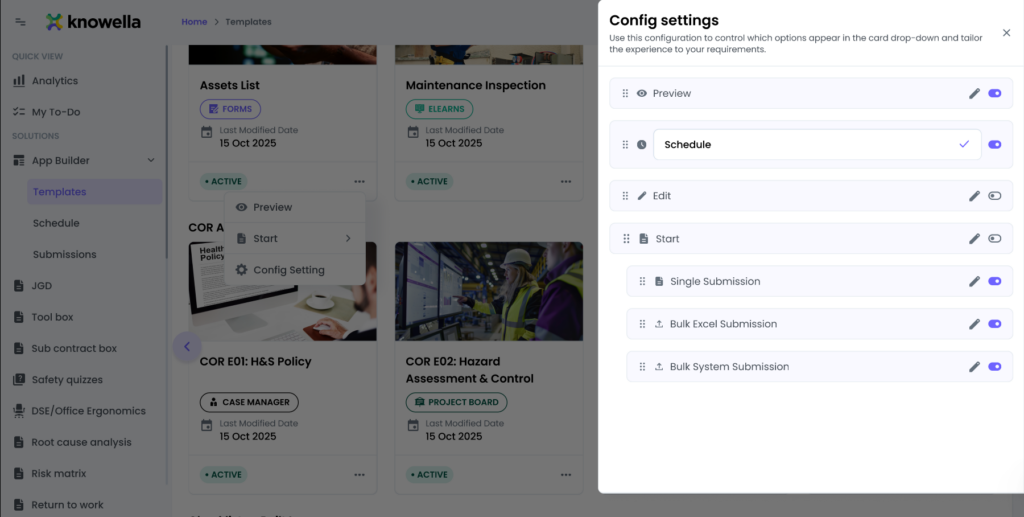
- Click the three dots (⋮) on the template card
- Choose Edit or Config Settings
- Update the required sections:
- General Information
- Build App (fields and structure)
- App Settings
- Review your changes carefully
- Click Save or Publish
Important notes
- Draft templates can be edited anytime before publishing
- Editing published templates may depend on permissions and system configuration
- Changes to active templates may impact ongoing data collection
Best practices
To avoid issues while editing templates:
- Use Preview mode to test changes before publishing
- Avoid major structural changes if the template is already widely used
- Use clear names and descriptions for fields and sections
- Communicate updates to teams if the template is actively in use
When should you edit a Template?
You may want to edit a template when:
- Business requirements change
- New fields or data points need to be captured
- Existing forms need improvement or simplification
- Errors or inconsistencies are identified
Need more help?
If you need assistance editing templates, contact: support@knowella.com.

