


Learn how to use the Repeat feature to capture multiple entries of the same data without duplicating sections.
The Repeat section feature allows users to enter the same set of information multiple times within a form.
Instead of creating duplicate sections manually, you can enable Repeat and let users add entries dynamically during form submission.
What is a Repeat Section?
A Repeat section allows a specific section in a template to be repeated multiple times.
This means users can:
- Fill the section once
- Add the same section again as needed
- Capture multiple entries of the same data
This is useful when collecting repeated information such as multiple items, people, or events.
Where is the Repeat option available?
The Repeat option is available in Step 2: Build App during template creation.
Once you add a section and fields, you can enable Repeat for that section.
How to enable Repeat on a section
Follow these steps:
- Log in to the Knowella platform
- Open App Builder
- Create a new template or edit an existing one
- Complete the General Information step
- Move to the Build App step
- Drag and drop a Section from the Layout panel
- Add the required fields inside the section
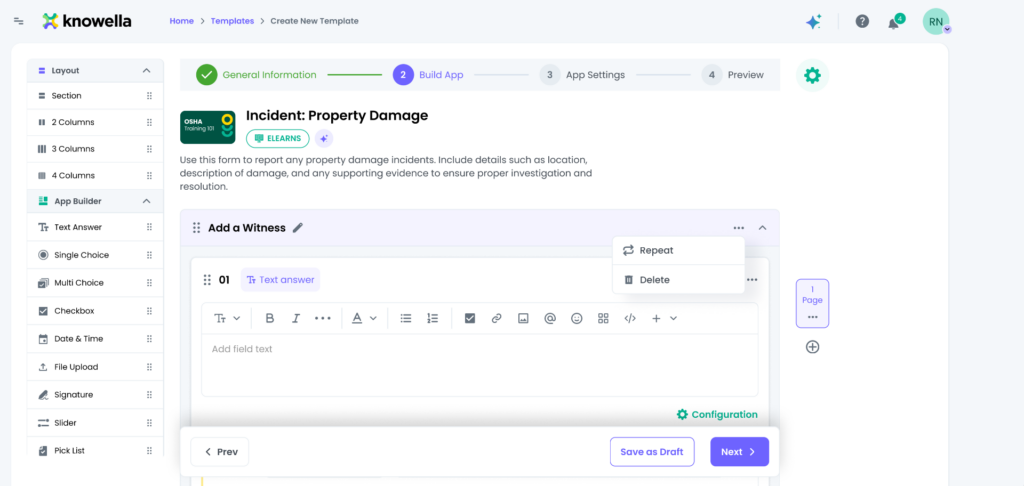
- Click the three dots (⋮) on the section header
- Select Repeat
How does the Repeat section work during submission?
Once enabled and published, the Repeat section becomes active for users.
During form submission:
- The user fills the section once
- An option appears to add another entry
- The user can repeat the section multiple times
- Each entry is saved as a separate record
Example use case
Example: Add a Witness section
If a form needs to capture details of multiple witnesses:
- Create a section called “Add a Witness”
- Enable Repeat for that section
- Users can add multiple witness entries during submission
- Each entry is stored separately
Why use Repeat sections?
Repeat sections help to:
- Avoid creating duplicate sections manually
- Keep forms clean and structured
- Allow flexible data entry
- Capture multiple records efficiently
Best practices
To use Repeat effectively:
- Enable Repeat only when multiple entries are expected
- Keep repeated sections simple and focused
- Use clear section names (e.g., “Add Item”, “Add Witness”)
- Test the behavior using Preview mode before publishing
Why this matters
Repeat sections make forms dynamic and scalable.
Using them correctly helps:
- Improve user experience
- Reduce form complexity
- Capture structured and repeatable data efficiently
Need more help?
If you need assistance with template design or advanced features, contact: support@knowella.com

