


Understand the key fields in the General Information step and how to correctly set up your template in Knowella.
The General Information section is the first step in creating a template in Knowella.
In this step, you define the basic details of your template, such as its type, category, name, and purpose. These details help users understand and identify the template before using it.
What is the General Information section?
The General Information section sets the foundation for your template.
It helps:
- Define what the template is used for
- Organize templates into categories
- Make templates easy to identify and use
Filling this section correctly ensures better clarity and usability across teams.
General Information fields
Below are the key fields included in this section:
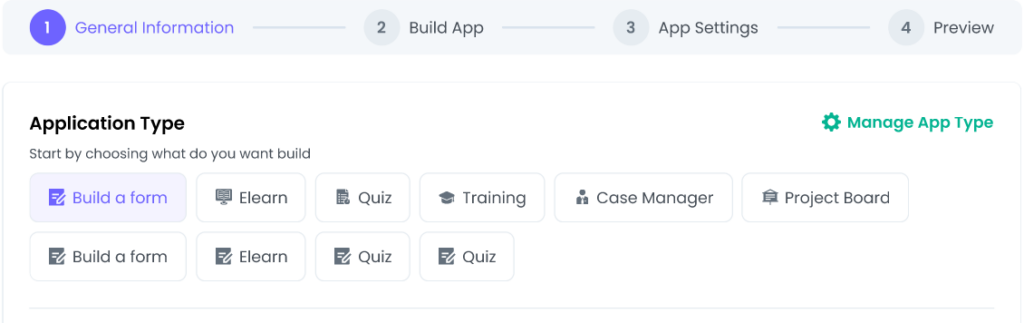
1. Application Type
This field defines the type of application you are creating.
Examples:
- Build a Form
- Checklist
- Data Collection App
Selecting the correct application type ensures the template behaves as expected.
2. Category
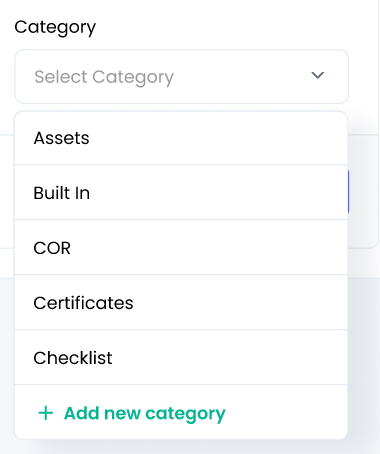
The Category helps organize templates within the platform.
It represents the module or group under which the template will appear.
Examples:
- Inspections
- RFP Management
- Audits & Compliance
Using categories makes it easier for users to find and manage templates.
3. Template Title
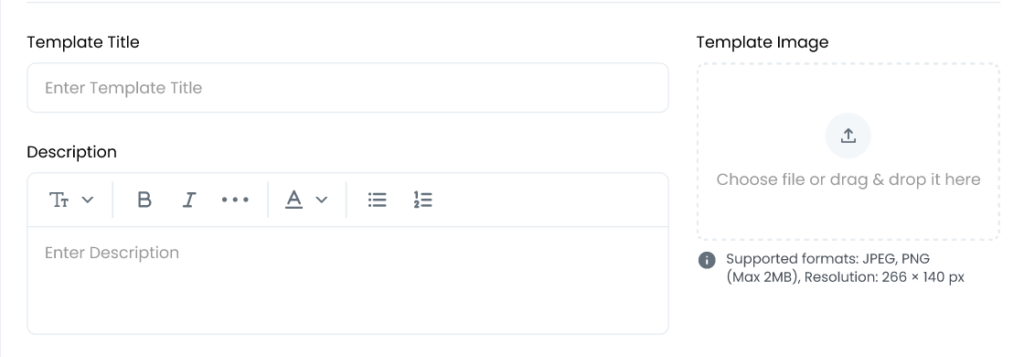
The Template Title is the name of your template.
Tips for naming:
- Use clear and descriptive titles
- Avoid short or unclear names
- Reflect the purpose of the template
A well-named template improves usability and searchability.
4. Description
The Description explains what the template is used for.
A clear description helps users understand when and how to use the template.
Example:
This template is used to capture daily safety inspection details for warehouse operations.
5. Template Image (Optional)
The Template Image is used to visually represent the template.
Adding an image helps users quickly identify the template, especially when multiple templates are available.
What happens next?
After completing the General Information section:
- Click Next
- Proceed to the next step
- Start building your template by adding sections and fields
Best practices
Follow these best practices for better results:
- Double-check the template title and category
- Use clear and meaningful descriptions
- Follow consistent naming conventions across templates
- Add a template image for better visibility (if available)
Why this matters
The General Information section sets the structure and identity of your template.
Getting this right helps ensure:
- Better organization across the platform
- Easier navigation for users
- Consistent data collection
Need more help?
If you need assistance while creating templates, contact: support@knowella.com

